
Grocery list
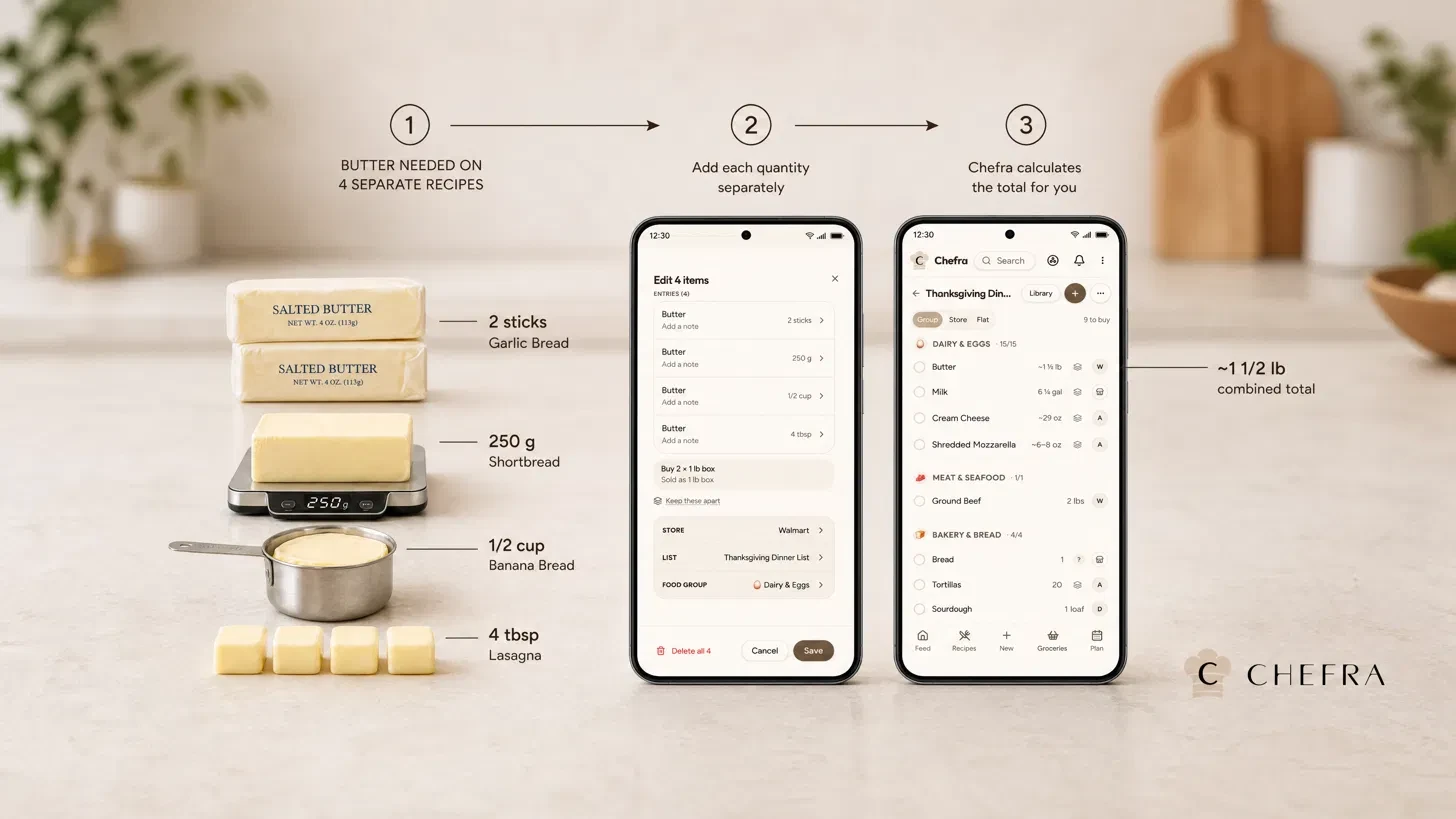
Chefra totals your grocery list
Add every ingredient from a recipe to any grocery list in one tap — pick the list, or make a new one right there — and the items are on it the moment you look.
By Chefra · Published · Last updated
Works in any browser, installs to your home screen, and is on the App Store and Google Play.
Look-alikes stay apart
Chefra won't merge things that only look alike — dried and fresh oregano, ground and whole cumin, red and white onions, salted and unsalted butter, canned and fresh tomatoes all stay on separate lines, even when the difference is written in brackets. Prep words like chopped, diced or minced don't keep lines apart.
Straight from your meal plan
Send the ingredients from today's, this week's or this month's meal plan to your grocery list, skipping what's already on it.
From a photo of a paper list
Snap a photo of a grocery list — handwritten or printed — and Chefra turns it into items on your list.
How amounts add up
The same food added more than once becomes one line, and amounts in the same kind of measure are added up, converting units (tsp/tbsp/cup, ml/l, g/kg, oz/lb).
- Ranges add up as ranges — '½–1 cup' twice becomes '1–2 cups', never a made-up single number.
- Mixed-unit totals are rounded to something you can measure.
- Counts (cans, bunches, packages) never convert into each other.
- Only entries on the same list combine.
- For combined lines Chefra suggests how many packages to buy (e.g. 'Buy 2 × 1 lb box'). Only in the edit sheet of a combined line, and only for many common packaged foods (not produce or chicken). The package count rounds up.
What stays separate
Items that can't be added together show as one line marked 'Listed separately', and 'to taste' items stay their own row.
- A 'Listed separately' line shows no total.
- A range mixed with a weight or a count is listed separately with no total.
Food groups, stores and notes
Grocery items sort themselves into food groups (Premium), and each item can carry its own store and a note.
- Food-group sorting uses fixed keyword rules, not AI.
- Items with no matching keyword go to 'Other'.
- Items can be moved by hand.
Nothing you clear is lost
Clearing checked-off grocery items doesn't delete them — they move into that list's library, and one tap adds them back.
- Deleted grocery items go to that list's trash and can be restored — an item deleted while ticked comes back ticked.
Grocery list questions
How does Chefra total my grocery list?
Chefra totals your grocery list automatically. The same food added more than once becomes one line, and amounts in the same kind of measure are added up, converting units (tsp/tbsp/cup, ml/l, g/kg, oz/lb).
What if amounts can't be added together?
Items that can't be added together show as one line marked 'Listed separately', and 'to taste' items stay their own row. A 'Listed separately' line shows no total.
How does Chefra handle cups and grams of the same food?
For everyday foods Chefra estimates across different measures (cups and grams, pieces and cups) using USDA FoodData Central weights, marked with '~'.
Will Chefra mix up look-alike items?
Chefra won't merge things that only look alike — dried and fresh oregano, ground and whole cumin, red and white onions, salted and unsalted butter, canned and fresh tomatoes all stay on separate lines, even when the difference is written in brackets. Prep words like chopped, diced or minced don't keep lines apart.
Does Chefra use AI to sort my groceries?
Food-group sorting (Premium) uses fixed keyword rules, not AI.
Can I add a whole recipe at once?
Add every ingredient from a recipe to any grocery list in one tap — pick the list, or make a new one right there — and the items are on it the moment you look. Ingredients that are already ticked off in the recipe are skipped.
Can I shop from my meal plan?
Send the ingredients from today's, this week's or this month's meal plan to your grocery list, skipping what's already on it.
Can I turn a paper list into a Chefra list?
Snap a photo of a grocery list — handwritten or printed — and Chefra turns it into items on your list.
What happens to items I clear or delete?
Clearing checked-off grocery items doesn't delete them — they move into that list's library, and one tap adds them back. Deleted grocery items go to that list's trash and can be restored — an item deleted while ticked comes back ticked.
Does Chefra show ads?
No ads, anywhere in Chefra.
More from Chefra
Meal planner
Plan meals from your saved recipes, then send the ingredients to your grocery list, skipping what's already on it.
Digital cookbook
Import recipes from a link, a photo or screenshot, or pasted text, and keep them in one place.
Recipe organizer
Cookbooks, tags, and search for your recipe library.